PLP Editorial Component
The PLP Editorial component displays a hero media element (image or video) at the top of the product grid on collection pages. It occupies a 2-column span in the grid layout and supports an optional text overlay.
Overview
The editorial can display one of two media types:
- Video — Sourced from Builder.io (
plp-editorial-videomodel) - Image — Sourced from Shopify metafield (
config.editorial_image)
Important: Video takes precedence over image. If both are configured, only the video will display.

Configuration
Image Editorial (Shopify)
Configure the image editorial directly in Shopify on the collection metafields:
| Metafield | Type | Description |
|---|---|---|
config.editorial_image | File (Image) | The editorial hero image |
config.editorial_text | Single line text | Optional text overlay displayed on the image |
The image will render using the TitleCard component with the aspect ratio matching the product card grid.
Video Editorial (Builder.io)
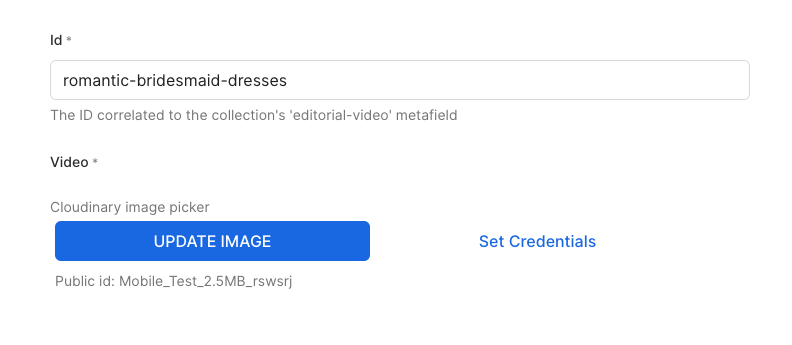
Video editorials are configured through Builder.io using the plp-editorial-video content model.
Setup Steps:
- Navigate to Builder.io/content
- Create a new entry in the
plp-editorial-videomodel - Upload a video using the Cloudinary image editor
- Copy the ID of the Builder entry
- In Shopify, add the Builder entry ID to the collection metafield:
config.editorial_video

| Metafield | Type | Description |
|---|---|---|
config.editorial_video | Single line text | Builder content model ID for the video |
The video will autoplay, loop, and be muted by default. A poster image is automatically generated from the video.
Precedence Logic
The component follows this priority order:
1. Video (if videoUrl AND videoId exist) → Render Video
2. Image (if imageUrl exists) → Render TitleCard with image
3. Neither → component not rendered
Text Overlay
The editorial_text metafield provides optional overlay text that appears on both image and video editorials:
- Positioned at the top-left of the editorial (
top-3 left-8) - Styled as white text (
text-white) - Rendered as an
<h2>element - Falls back to the collection title for accessibility (
aria-label)
Note: The text overlay uses the same Shopify metafield regardless of whether displaying image or video.
Video Specifications
When using video editorials:
| Property | Value |
|---|---|
| Autoplay | true |
| Muted | true |
| Loop | true |
| Plays Inline | true |
| Preload | metadata |
Videos are served from Cloudinary with automatic poster generation.
Troubleshooting
Editorial not displaying
- Check metafields exist: Verify
config.editorial_imageorconfig.editorial_videois set on the collection - Check Builder ID: If using video, ensure the Builder entry ID in
config.editorial_videomatches an existing entry - Check video data: Video requires both
urlandpublic_idfrom Cloudinary; if either is missing, falls back to image